
Delaware franchise tax
A Delaware corporation files an annual report and pays franchise tax by March 1. The state's default invoice uses the method that is usually far more expensive for a startup. Tenacap computes the tax both ways Delaware allows, recommends the lower amount, prepares a PDF worksheet, and can remind you before the deadline.
The page is Compliance & Tax → DE Filing in the left navigation, shown for companies whose jurisdiction is Delaware. It is a worksheet built from your company record and cap table. Tenacap does not file or pay with the state.
Prepare and file, step by step
- Open DE Filing. The tax year defaults to the year the coming March 1 filing covers; the year links in the header switch it.
- Under Filing details, enter your total gross assets and the state form’s other fields, then Save filing details.
- Read the recommendation and download the prepared PDF.
- Use Open Delaware filing portal, choose the recommended method, and file and pay there.
- Back in Tenacap, Save prepared filing for the year, then enter the amount paid and confirmation number and Mark filed.
Filling in details, saving and marking filed take the Editor or Admin role.
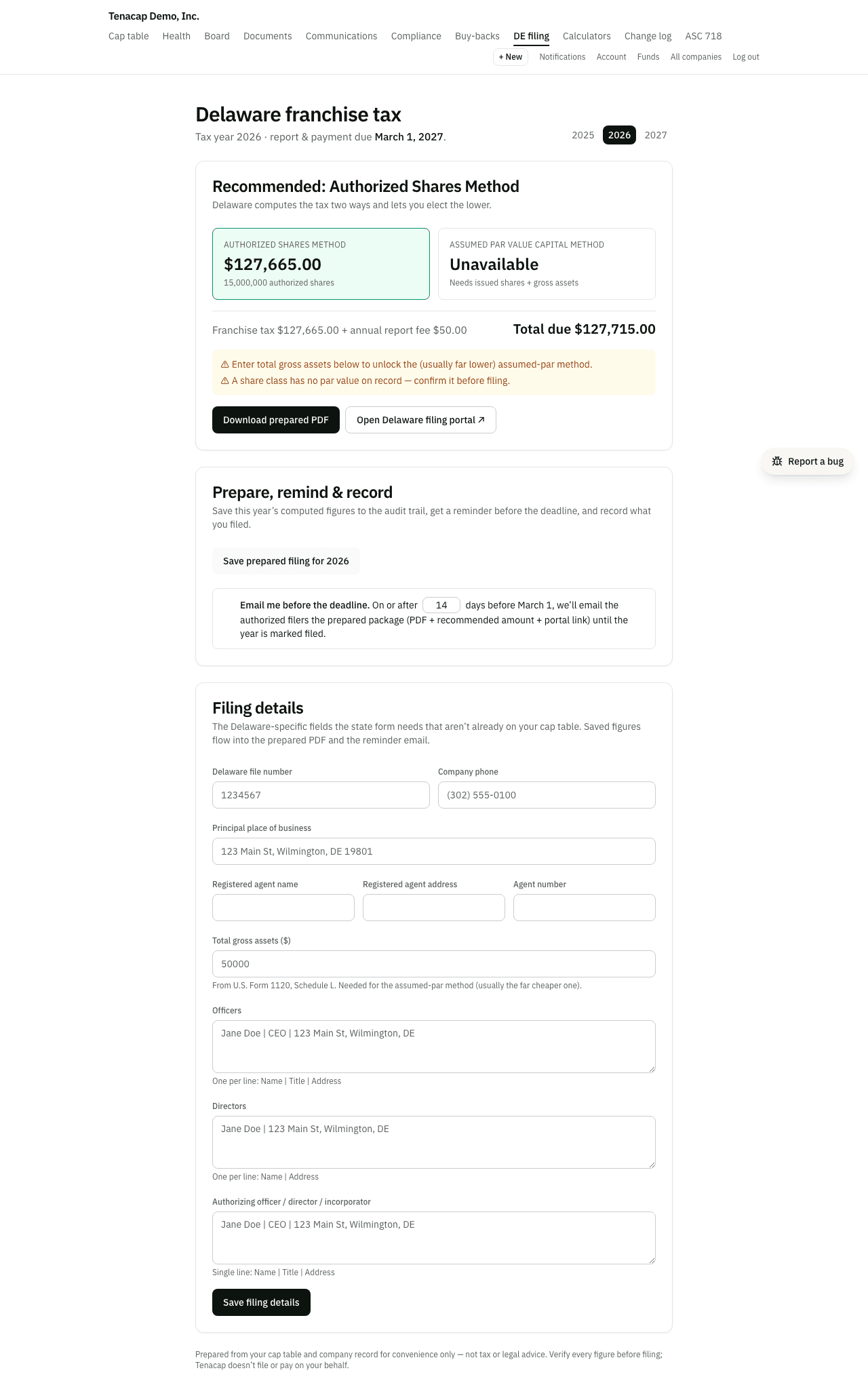
The two methods
Under 8 Del. C. §503 you owe the lesser of two computations. Tenacap shows both, marks the lower one recommended, and adds the $50 annual report fee to give the total due.
- Authorized Shares Method: a step function of the number of authorized shares ($175 up to 5,000 shares, $250 up to 10,000, then $85 for each further 10,000 or part, capped at $200,000). This is the state’s default invoice. A startup with 10,000,000 authorized shares is billed $85,165 under it.
- Assumed Par Value Capital Method: divides total gross assets by issued shares to get an “assumed par”, applies the higher of that and each class’s stated par to its authorized shares, and charges $400 per $1,000,000 of the result or part of one, with a $400 minimum. For most early-stage companies this is at or near $400.
For example, 10,000,000 authorized shares at $0.0001 par, 9,000,000 issued and $1,500,000 of gross assets give an assumed par of $0.166667 and assumed par value capital of $1,666,670. That is two millions or part, so $800, against $85,165 under the Authorized Shares Method. With the $50 fee, $850 is due.
Filing details
Tenacap takes your legal name, incorporation date, authorized shares and par values from your records, and issued shares from your cap table. Enter the Delaware-specific fields under Filing details: file number, phone, principal place of business, registered agent, officers, directors, and the authorizing officer or director. Anything left blank is marked “needs input” on the PDF.
Gross assets
The Assumed Par Value method needs your total gross assets: the total assets on U.S. Form 1120, Schedule L, for the fiscal year ending in the calendar year before you file. Enter it in Filing details. If an admin has already entered total assets for Rule 701, Tenacap uses that figure unless you enter one here.
Filing on the state portal
On the Delaware portal, choose the recommended method and enter the issued shares and gross assets from the worksheet; the portal recomputes the tax. The report and payment are due March 1. A late report draws a $200 penalty, and unpaid tax accrues interest at 1.5% a month.
The reminder email
Tick Email me before the deadline and set how many days before March 1 it should go (14 by default, from 1 to 120). Once that window opens, each admin of the workspace gets one email for the tax year with the recommended amount, the portal link and the prepared PDF attached. No email is sent for a year already marked filed.
Record what you filed
Save prepared filing stores that year’s computed figures in your audit trail and adds the year to the History list. After you file on the portal, enter the amount paid and the state confirmation number on that year’s row and click Mark filed. History keeps what was owed and paid, year by year.
With an assistant
A connected assistant can take each step above as a proposal that an Editor or Admin confirms in the app:
save_de_filing_profilefills in the filing details. A field it leaves out keeps its value. When it changes gross assets, the proposal shows the tax and fee before and after.prepare_de_filingsaves the year’s figures as the prepared filing, the same figures the page shows. They are worked out again when you confirm. If the cap table changed after the assistant proposed, you are asked to review the new figures first.mark_de_filedrecords the amount paid and the confirmation number, andset_de_reminderturns the reminder email on or off.
Nothing is filed or paid with the state; that is still yours to do on the Delaware portal.
What the worksheet does not cover
These Delaware rules are not computed. Check them with your accountant if they apply:
- A partial first year. A company incorporated during the year owes a prorated tax; the worksheet shows a full year.
- A change in authorized shares during the year, which Delaware prorates across the periods before and after.
- Quarterly estimates. A company that owes $5,000 or more pays estimated installments (40% by June 1, 20% by September 1, 20% by December 1, the rest by March 1).
- The large corporate filer rate of $250,000 for certain listed companies.
LLCs: the flat annual tax
A Delaware LLC (or LP or general partnership) files no annual report and owes a flat annual tax, with none of the authorized-shares or gross-assets math. It is $400 for tax year 2026 and later ($300 through tax year 2025; Delaware raised it effective January 1, 2026). It is due June 1 of the year it covers, so an LLC pays for the current year where a corporation pays for the year just ended. Late payment draws the same $200 penalty and 1.5% monthly interest.
For an LLC, DE Filing shows the flat amount for the year you pick, a link to the state’s LP/LLC/GP tax portal, the same reminder counted back from June 1 (a text email with the amount and portal link), and the same record of what you paid. See Tenacap for LLCs.