Export & open schema
Your cap table is yours. Tenacap exports the whole thing in one click - as a spreadsheet, as a single open-schema JSON file, as a checksummed zip of the cap table, as a standards-compliant Open Cap Format bundle, or as one complete archive of every record and document with a manifest you can verify - so you can back it up, hand it to your accountant, or walk away. These are reports you keep; they do not upload back.
“One-click export, open schema, no lock-in” is a promise written into our terms. Every Tenacap account can pull its complete state out at any time, in a format that’s openly documented and licensed so any tool - or your own accountant - can read it.
How to export
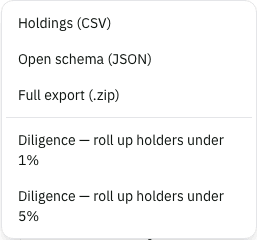
Open Cap Table → View (your cap table), click Export, and choose Outstanding shares (CSV), the open-schema JSON, Cap table with checksums (.zip), the Open Cap Format (OCF) bundle, or Complete archive (.zip). The same menu has the two diligence downloads. The CSV, JSON and cap-table zip download straight to your machine. The complete archive is built in steps while you watch, then downloads; a company with many documents takes a minute or two. Each export covers only the company you’re looking at.
The diligence CSV has one row per stakeholder and two percentages. Ownership % (fully diluted) is the figure your cap table shows: issued shares plus options granted, RSUs, warrants and the unallocated pool. Those not-yet-issued amounts are listed under the holders, with a Fully diluted total, so the column adds up. Ownership % (outstanding) counts issued shares only. Holders below the roll-up threshold, measured on fully diluted, are combined into one line.
The five formats
Pick the one that matches what you’re doing:
- CSV - a flattened sheet of your outstanding shares (stakeholder, share class, certificate, quantity, price, issue date) that opens straight in Excel or Google Sheets. Six columns, one row per outstanding security. Best for a quick look or a one-off analysis. It leaves out option grants, SAFEs and convertible notes, unissued pool shares, and anything cancelled or transferred away, so its share total is smaller than your fully-diluted total. For the whole picture, use the JSON.
- JSON - the complete
cap-table.json: every share class, stakeholder, security, convertible, transaction, and audit-log entry, in our open schema. - Cap table with checksums (.zip) - the validated
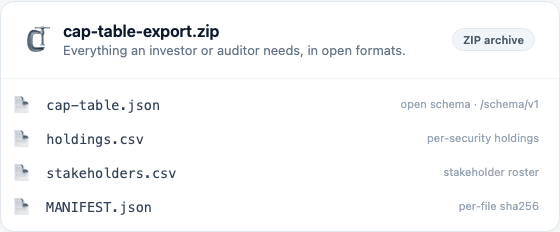
cap-table.json, the two CSV sheets, and aMANIFEST.jsonthat fingerprints every file. Cap-table data only - a small, self-verifying snapshot. - Open Cap Format (OCF) bundle - a manifest plus object files built to the Open Cap Table Coalition’s own standard (version 1.2.0), for moving your cap table into another OCF-reading tool. A different format from the open schema above - see Open Cap Format below.
- Complete archive (.zip) - everything Tenacap holds for the company: the same cap-table files, plus every board approval, consent, financing, 409A, tax record, option pool, signature request and signer record, prior cap-table version and audit entry as JSON, plus the documents themselves - sealed signature PDFs, uploaded documents, 409A reports, attached files, and the export you originally imported from - each fingerprinted in a manifest, with a coverage report that says what the database held next to what was written. This is the file to keep if you leave, and the one to hand to counsel.
What’s in the complete archive
Open it and the first file is README.md, which explains everything below without Tenacap. Then MANIFEST.json: one entry per file with its path, byte size, SHA-256 checksum and a status. And COVERAGE.json: for every kind of record we store, the number of rows in the database when the archive was built next to the number written into it, so “complete” is a checked fact. The four operational tables we leave out (request de-duplication keys, a derived cache, a certificate counter, and the archive job itself) are named there with a reason each.
Then the records: cap-table.json in the open v1 schema, the two CSV sheets, and six sibling files - governance.json, valuations.json, tax.json, equity-extras.json, documents.json and history.json - holding the raw rows of every table, with every share count and every amount as a decimal string so nothing rounds. Where a row concerns a person or a security it also names them in words (legal name, email, certificate number, share class, quantity, issue date), and says whether that link was recorded at the time or reconstructed when the archive was built. A schema/ folder holds JSON Schema for every one of these files.
Then the documents, under documents/: sealed signature PDFs, the documents you sent for signature, 409A reports we stored, files attached to grants and approvals, and the Carta, Pulley or Mantle export you imported from. Each is copied as stored and hashed. Re-hash any file, compare it to the manifest, and you have proof it hasn’t been altered since Tenacap wrote it.
What the archive does not hold yet. A signed agreement with the signatures stamped onto its pages. Today a sealed PDF is the agreement as sent plus a certificate page; freezing the document at send and stamping it at completion is a separate change we are building, and until it ships the archive labels what it holds as a sealed copy.
The open, versioned schema
The JSON export conforms to the Tenacap open schema: version v1, published under Apache-2.0, and versioned with semver. Every section is documented field by field on our public open-schema reference, and any breaking change comes with a major-version bump and a six-month deprecation window. The reference also has an annotated sample and the governance rules.
Open Cap Format (OCF)
OCF is a separate, external standard from the open schema above - the Open Cap Table Coalition’s own JSON schema family, built so any cap-table tool can read a company it did not create. Tenacap’s OCF export targets version 1.2.0: a manifest file naming your company, plus one file each for stakeholders, stock classes, stock plans, vesting terms, valuations and the transaction history - issuances, transfers, repurchases, cancellations, conversions and exercises.
A few things Tenacap tracks have no OCF equivalent - phantom and stock-appreciation awards, and shares a board retired from treasury. Rather than drop these silently or force them into the wrong object, the bundle’s own manifest names what was left out and why. Read it before handing the bundle to another tool.
An OCF bundle also comes back in: Tenacap recognises one on upload the same way it recognises Carta, Pulley or Mantle, whether it came from Tenacap or another OCF-producing tool. See Imports.
You do not need an account to try this: upload your Carta or Pulley export and a “Download as OCF” button appears on the reconciliation report, built from that preview before anything is saved to a cap table. It covers share issuances, transfers, repurchases and cancellations; options, RSUs, SAFEs, notes and warrants are not yet included at that pre-account stage, and the bundle says so itself. A source export that did not fully reconcile is named in the bundle too, not smoothed over.
Backup, portability & migration
Exports are for taking your data out - to back it up, to hand to your accountant or counsel, to load into another tool, or to walk away. The JSON is complete for the cap table and the complete archive is complete for everything, and both are self-verifying: keep a copy in your own storage and you hold a full snapshot of your ownership records and documents. Every field is documented on the public open-schema reference and in the archive’s own schema/ folder.
Migration out is supported. If you move to another tool, hand it the open-schema JSON; if you’re coming the other way, see Importing your cap table. The schema is published under Apache-2.0, so any tool may read it without asking us.