
Recording a priced round
When a priced round closes, it lands on your cap table as one all-or-nothing ledger entry: a new preferred class, the new money, and every converting SAFE and note.
Scenario modeling answers where does everyone land? as a private what-if. Once the term sheet is signed and the money is in, recording the round writes the close to your cap table. It issues a new preferred class, creates the new investors’ shares at the round price, and converts each outstanding SAFE or convertible note on its own terms, as one ledger event.
Model it first
The record panel sits below the round pro forma, which is your preview. Run the round there first (pre-money valuation, new money, SAFE conversions, pool top-up) and check the dilution and ownership. The close uses the same round solver as the preview, so the same inputs give the same numbers.
Open the record panel
Open Cap Table → Model → Round pro forma (or Model a round (pro forma) on your cap table) and scroll past the results to Record this round. Only admins see it. The panel collects everything the close needs across a few sections: the round details, the preferred class, the new-money investors, which convertibles convert, and the pool top-up.
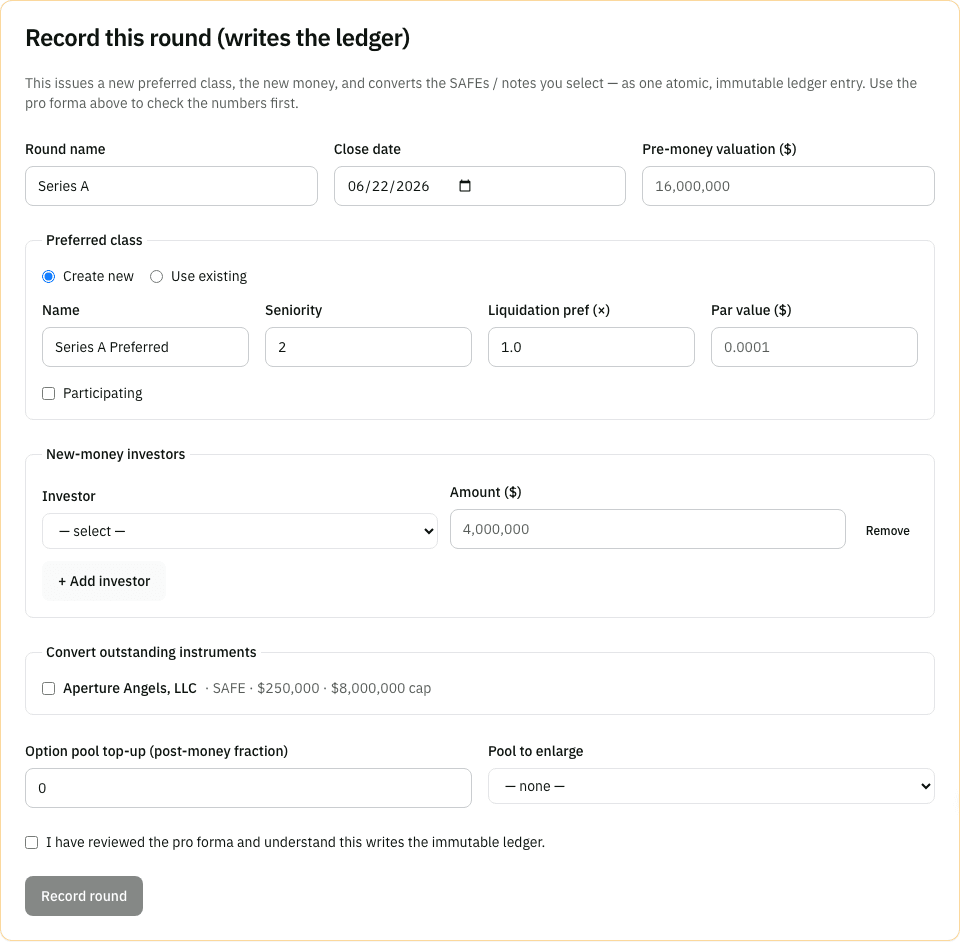
Start with the three round details at the top: a round name (for example, “Series A”), the close date the round converts on, and the pre-money valuation. The pre-money divided by your fully-diluted shares after the convertibles convert, plus the pool increase, sets the price per share - the term-sheet convention, and the number every new share and every conversion is priced off. Fully diluted counts outstanding shares, granted options and the unissued pool.
The preferred class
The new money buys a new class of preferred stock. You have two choices:
- Create new - name it (e.g. “Series A Preferred”), set its seniority (where it sits in the liquidation stack), its liquidation preference multiple, an optional par value, and whether it’s participating. Tenacap creates the class as part of the close and authorizes as many shares as the round issues into it.
- Use existing - issue and convert into a preferred class you already have. That class needs enough authorized room for the round’s shares, or the close is refused (see how many shares you can issue).
New-money investors
Add a row for each investor putting in new cash: pick the stakeholder and enter the amount in dollars. Use + Add investor for as many as the round has. Each amount is divided by the round price to issue that investor’s new preferred shares.
Converting SAFEs & notes
The Convert outstanding instruments section lists every SAFE and convertible note recorded as outstanding, with the holder and a short summary. Tick the ones that convert in this round. Each converts at the lowest of its cap price, its discount price and the round price, as described in SAFEs & convertibles.
A convertible note converts on its principal plus accrued interest. Tenacap computes the interest from the note’s rate, issue date, close date, and day-count convention, and records the principal and interest split on the conversion.

Option pool top-up
Rounds usually enlarge the option pool. Enter the pool target as a fraction of the post-money fully-diluted total - for example, 0.10 for a ten-percent unissued pool after the round - and pick the plan to enlarge under Pool to enlarge. Tenacap adds only what the unissued pool is short of the target, counted in the pre-money share count (the pre-money shuffle). If the pool already meets the target, nothing is added. Leave the target at 0 if the round doesn’t change the pool.
The increase grows the plan’s authorized size without issuing anything. If the plan names its share class, the increase is also reserved against that class, and the whole close is refused when the class has no room for it (authorized minus issued minus reserved; see plan reserves).
Confirm & record
Below the form is a confirmation checkbox. Tick “I have reviewed the pro forma and understand this writes the append-only, tamper-evident ledger” to enable the Record round button. When you submit, Tenacap resolves the round one final time and writes the whole close as a single batch, in this order: the new class is authorized, each investor’s shares are issued, each convertible is converted, and the pool increase is reserved.
On success, Round recorded shows the price per share, the new preferred issued, the shares converted into preferred, any option pool increase, the post-round fully diluted total, and the number of ledger transactions written, with a link to the updated cap table.

After the round closes
Your cap table now shows the new preferred lots and the new investors, and the converted SAFEs and notes leave the Convertibles & SAFEs tab. The round appears on the Financings tab as one record linked to every ledger transaction it created.
From here, the live cap table is the source of truth. You can hand it to an auditor or new investor in an open format any time from Export & open schema, and the converted preferred carries the rights you set, ready for compliance and tax reporting down the line.