
Share buy-backs
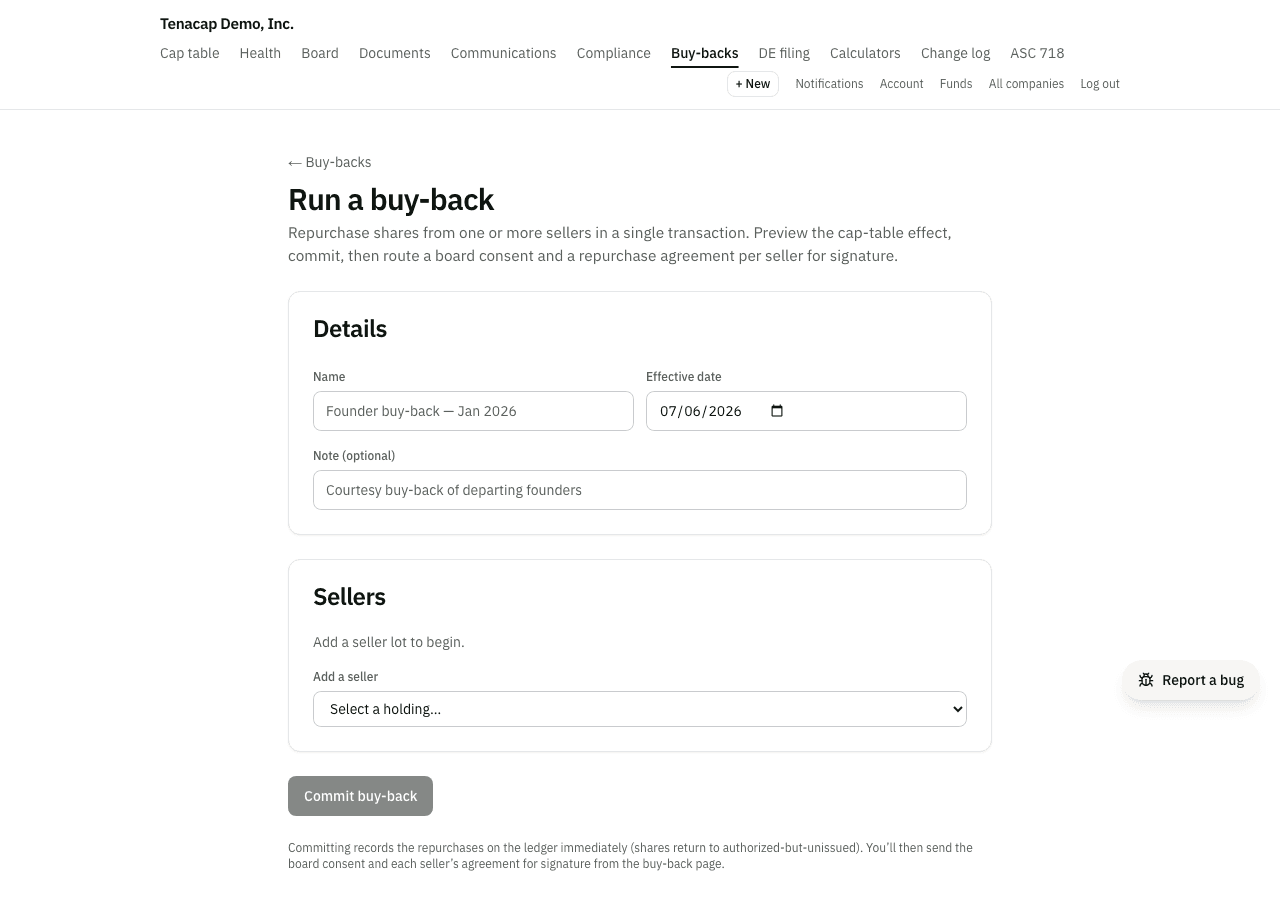
To buy shares back from one or more holders, open the seller's stakeholder page and choose Buy back shares. Tenacap previews the cap-table effect, records the repurchase on the ledger, and routes a board consent and a repurchase agreement per seller for signature. The shares then sit in treasury until the board retires them.
When to use it
Use a buy-back when the company itself reacquires issued shares: a founder leaving, a repurchase of unvested stock, a courtesy buy-out. To move shares to a different holder, use a transfer instead. To void a certificate that should never have existed (a forfeiture or a correction), cancel it; a cancellation retires the shares at once, because nothing was bought.
Running a buy-back
- Open the seller from Cap Table → Stakeholders and click Buy back shares (editors and admins). The wizard opens with that holder selected. View buy-back history on the same page, and the Buy-backs link on the 409A page, list past batches.
- Give the batch a name and an effective date.
- Under Sellers, add each holding being bought back. For each, enter the shares to buy back (all of the lot or part of it) and the price per share. Several sellers can share one batch and one board consent.
For a single lot there is also Record a repurchase on the seller’s page, under Change this holder’s records. It writes the same ledger entry, then offers to send the seller a repurchase agreement and to draft the board consent.
Preview & commit
As you add sellers, the Cap-table effect card updates: shares outstanding before and after, total shares repurchased, total consideration, and each holder’s share of outstanding stock before and after. Nothing is written until you click Commit buy-back, which needs the admin role. The batch posts as one unit: every seller’s repurchase is recorded, or none is.
Board consent & agreements
The buy-back’s page has two sections. Board consent sends one shared consent to your directors (admins only). Sellers & repurchase agreements sends each seller a Stock Repurchase Agreement. Both go out as no-login signing links (see Documents & e-signature). Each document reads Not sent, Out for signature or Signed; once signed, download the sealed PDF with its completion certificate from the same page.
A board acting by written consent acts only when every director has signed (DGCL §141(f)). So sending the consent records the board approval as a draft, and it becomes approved, dated with the last director’s signature, when the last director signs. If a director declines, it stays a draft. The buy-back’s page and the Board page show it as pending until then. Name every director as a signer: if someone on your board roster is missing, Tenacap warns you before it sends. Buy-backs whose consent was sent before 29 September 2026 were recorded as approved when sent, and are left as they are.
What changes on the cap table
Each repurchase is a REPURCHASE_SHARES ledger entry. The seller’s holding drops to zero, or to the remainder for a partial buy-back. Shares outstanding and fully diluted go down by the shares bought back. Shares issued do not change, and neither does the authorized count: the bought-back shares move to treasury. The bar at the top of the cap table shows them as its Treasury part, and the entry appears in your change log.
Treasury shares and retirement
Under Delaware law a share the company buys back is still issued but no longer outstanding (DGCL §160, §243). It carries no vote and no ownership and is left out of fully diluted, but it still uses up authorized room and still counts in the issued-share figure the Delaware franchise tax’s assumed-par method uses. It returns to authorized-and-unissued only when the board retires it by resolution (§243(b)).
While a class holds treasury shares, the company overview lists Pending board action: retire treasury shares under Needs attention, and the Board page shows a card to record the resolution. An admin enters the number of shares to retire (all or part of the treasury balance), the resolution date and an optional note. That writes a RETIRE_SHARES ledger entry and a Treasury retirement board approval together. Many early-stage boards retire in the same consent that approves the buy-back, so both are often dated the same day.
A worked example, for a class with 10,000,000 authorized and 9,000,000 issued:
| Step | Issued | Outstanding | Treasury | Unissued |
|---|---|---|---|---|
| Before | 9,000,000 | 9,000,000 | 0 | 1,000,000 |
| Buy back 500,000 | 9,000,000 | 8,500,000 | 500,000 | 1,000,000 |
| Board retires the 500,000 | 8,500,000 | 8,500,000 | 0 | 1,500,000 |
Issuing again after a buy-back
Delaware lets a company resell treasury shares (DGCL §153(c), §160(b)), so you do not have to retire them before issuing more. Tenacap issues from never-issued room first and draws on treasury only for the part that does not fit. The same rule covers an issuance, a SAFE or note conversion, and an option exercise. For an issuance or a conversion, the room is authorized minus issued minus what your option plans reserve. For an exercise it is authorized minus issued, because the exercise uses the plan’s own reservation.
In the example above, if the company issues 1,200,000 shares before the board retires anything, 1,000,000 come from unissued room and 200,000 are resold from treasury. Afterwards issued is 10,000,000, outstanding 9,700,000, treasury 300,000 and unissued 0. An issuance larger than the room plus treasury is refused.
Buy-backs and QSBS
A company buying back its own stock can affect whether other stock it issues counts as qualified small business stock (IRC §1202(c)(3)). Two rules apply, each with a floor below which a purchase is ignored: more than $10,000 and more than 2% of the stock (Treas. Reg. §1.1202-2).
- Buying from one holder above the floor can mean stock that holder, or a related person, gets from the company in the two years before or after is not QSBS.
- Buying back more than 5% of the value of all the company’s stock within a year either side of an issuance can mean the stock issued then is not QSBS, for everyone.
A purchase connected with the seller leaving the company, or with a death, disability or divorce, is ignored. When a buy-back is over either floor, the preview and the confirmation say so. Tenacap measures this by share count, not value, and its QSBS report does not account for buy-backs, so check with your tax adviser.
With your assistant
A connected assistant can do everything on this page. It can preview a buy-back across several sellers, propose recording it, list past buy-backs with where each document stands, and propose sending the board consent or a seller’s agreement.
Recording a buy-back needs an Admin to confirm, and the confirmation shows every holder’s shares and ownership before and after, the shares moving to treasury and the total paid. If anything on the cap table changes before it is confirmed, you are asked to review the new figures first. The board consent and each agreement go out only when a person confirms them. The assistant can ask; it cannot send.